AI Agent architecture
The Fluid Attacks platform's AI Agent helps you manage vulnerabilities and provides guidance on configurations, as well as information about your organizations and groups, all using natural language. In this article, we present its architecture. If you need to learn how to use it, we invite you to read the article "Ask the AI Agent."
Diagram and procedure
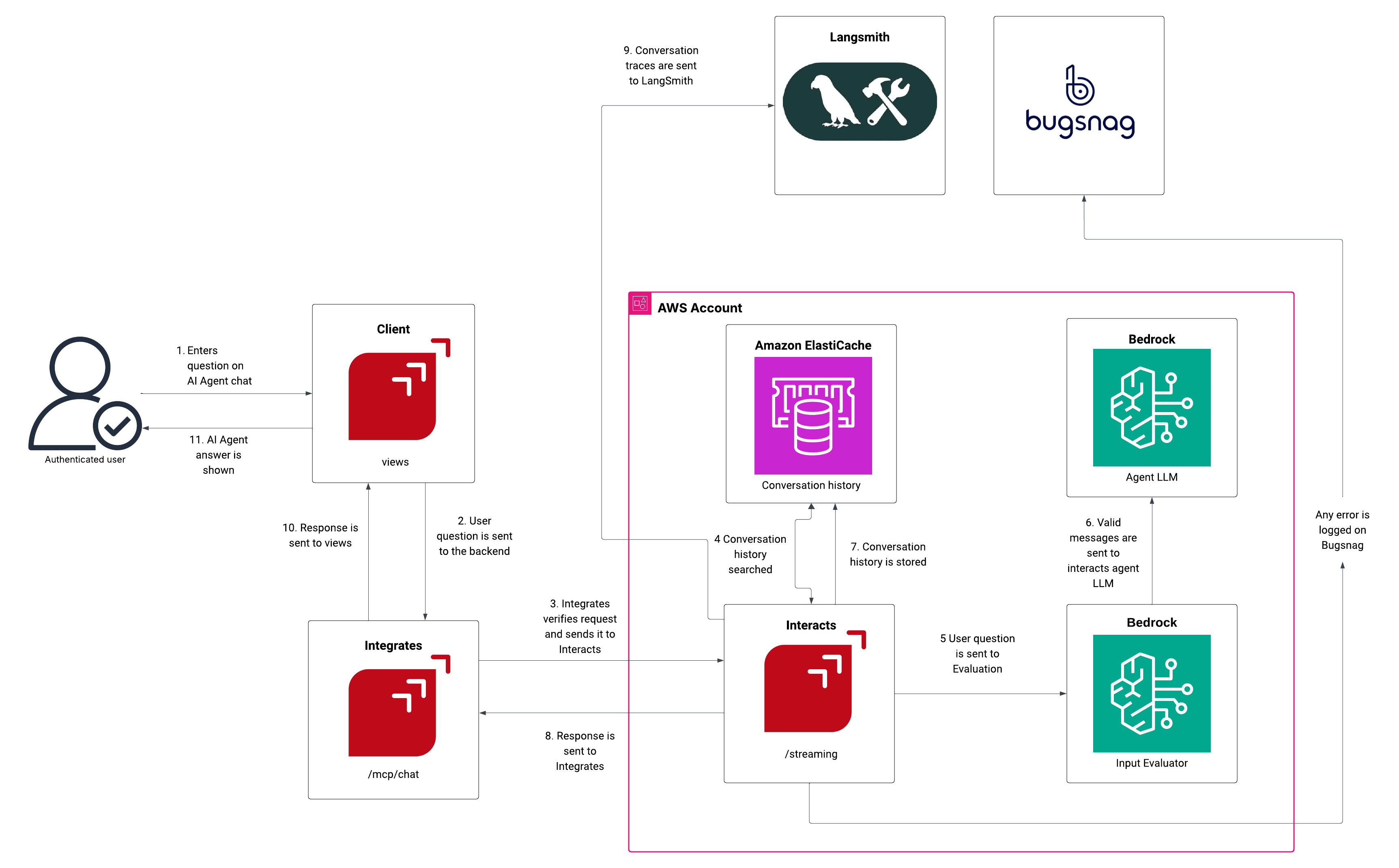
-
User request in chat:
- An authenticated user enters a question in the AI Agent chat interface
- The request is sent from Client (Views component)
- Request routing:
- The user's question is sent to the backend (Integrates component) to the websocket endpoint (/mcp/chat)
- Integrates verifies the request and forwards it to the Interacts component to the /prompt endpoint
- Conversation context retrieval:
- Interacts queries Amazon ElastiCache to search for relevant conversation history
- This provides context for the AI to maintain conversation continuity
- AI processing:
- Our Guardrail evaluates the user's question
- Bedrock (AI model) generates the actual AI response based on the user's question and conversation history
- Post-generation concurrent operations:
- The updated conversation history is stored back in Amazon ElastiCache, ensuring future interactions have the complete conversation context
- Monitoring and logging: Conversation traces are sent to LangSmith for monitoring and debugging purposes
- Response delivery:
- The response is sent from Interacts to Integrates
- Integrates forwards the response to Client
- AI Agent's answer is displayed to the authenticated user
- Error handling: Throughout the process, any errors are captured and logged in Bugsnag for monitoring and debugging
The core
MCP (Model Context Protocol) is a communication standard that allows AI assistants (e.g., Claude, ChatGPT, Gemini) to connect with external tools and services. We use it to connect the AI Agent with the Fluid Attacks platform. To learn about its implementation, we invite you to read the article "Install and use MCP for AI tool integration."